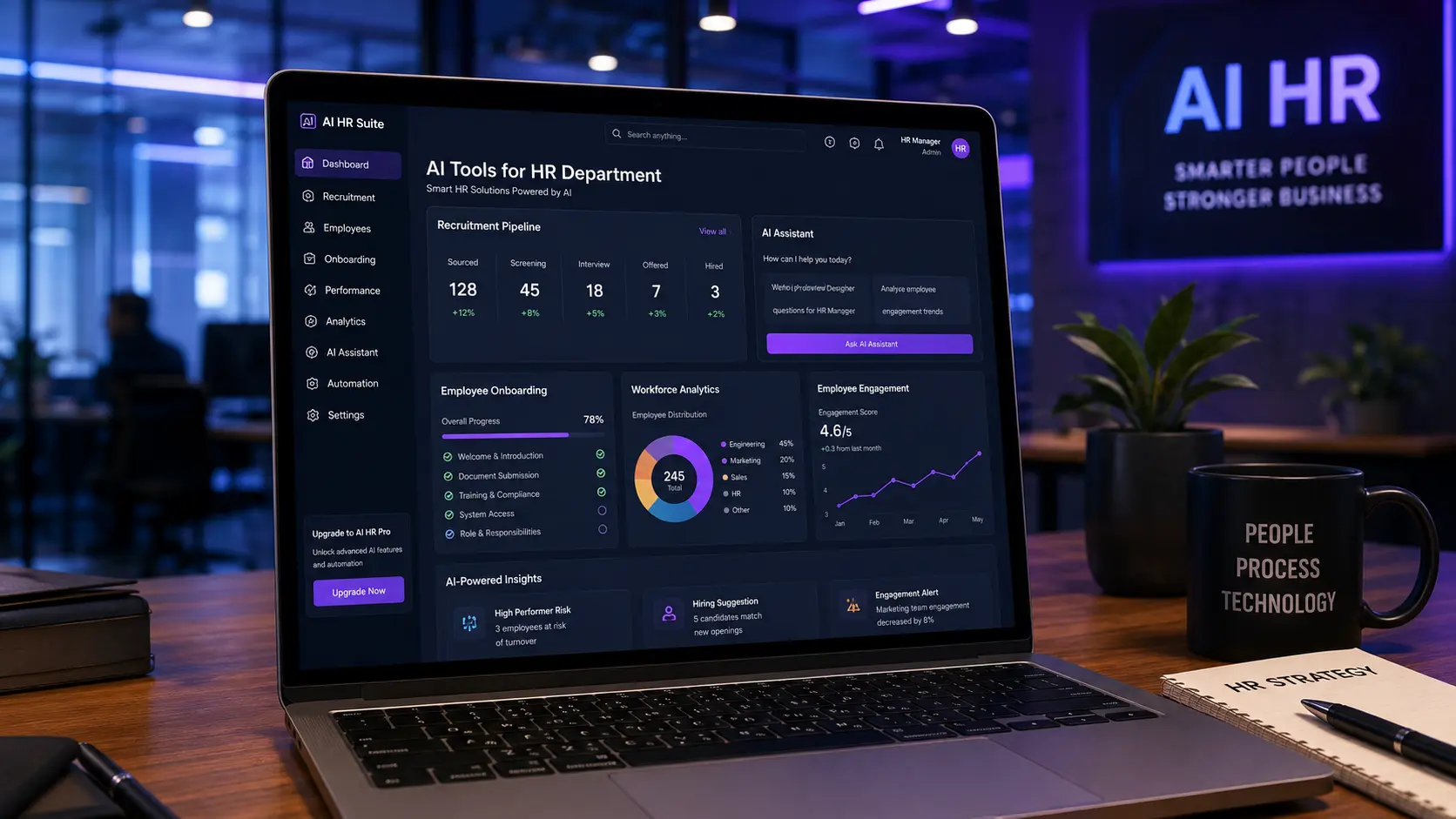
AI Tools for HR Department: The Complete Guide to Modern Human Resources in 2026
Human Resources has evolved far beyond payroll and paperwork. Today’s HR teams are expected to recruit faster, improve employee experience, reduce administrative work, stay compliant with changing regulations, and provide meaningful insights to business leaders.
This growing workload explains why AI tools for HR department teams have become one of the fastest-growing technology investments across organizations of every size.
Artificial intelligence doesn’t replace HR professionals. Instead, it removes repetitive work so HR teams can spend more time building culture, supporting employees, and making better strategic decisions.
Whether you work for a startup with one HR manager or an enterprise with an entire people operations department, the right AI tools can dramatically improve productivity.
In this guide, you’ll learn what AI tools for HR department teams actually do, which tools are worth considering, which HR tasks should be automated, which tasks should remain human, how to build an AI-powered HR workflow, common mistakes organizations make, and how to choose the right solution for your business.
If you’re also exploring broader AI software, compare this topic with top AI tools, AI tools for content creation, AI tools for freelancers, and free AI tools for human resources.
Table of Contents
What Are AI Tools for HR Department Teams? Why AI Matters for Modern HR Departments The Biggest HR Challenges AI Can Help Solve Core Areas Where AI Helps HR Departments Benefits of AI Tools for HR Department Teams Best AI Tools for HR Department Teams AI Tools for HR Department Comparison Which AI Tool Is Right for Your HR Department? HR Workflow Using AI 30-Day AI Implementation Roadmap AI Maturity Framework for HR Departments Expected ROI HR Tasks That Should Remain Human Frequently Asked Questions Final VerdictWhat Are AI Tools for HR Department Teams?
Quick Answer: AI tools for HR department teams are software applications that use artificial intelligence to automate repetitive HR tasks, assist decision-making, improve hiring processes, support employee engagement, and streamline workforce management.
Unlike traditional HR software, AI systems continuously analyze information and help HR professionals make faster, more informed decisions.
Instead of manually reviewing thousands of resumes, scheduling interviews, answering repetitive employee questions, or organizing HR documents, AI can assist with many of these processes.
Some AI tools specialize in recruiting. Others focus on onboarding. Some improve learning and development. Others analyze workforce data to identify trends before they become larger organizational issues.
The goal isn’t replacing HR professionals. The goal is making HR departments more efficient.
Why AI Matters for Modern HR Departments
Quick Answer: AI allows HR teams to spend less time on administration and more time supporting employees and business growth.
The reality is that HR departments often struggle with repetitive work. Examples include resume screening, interview scheduling, candidate communication, employee onboarding, internal HR support, policy management, documentation, and performance tracking.
Many of these activities follow predictable patterns. That makes them excellent candidates for AI assistance.
For example, instead of manually responding to hundreds of identical employee questions about leave policies, benefits, or company procedures, an AI assistant can answer routine questions instantly while forwarding complex cases to HR specialists.
This improves response times while reducing workload.
The Biggest HR Challenges AI Can Help Solve
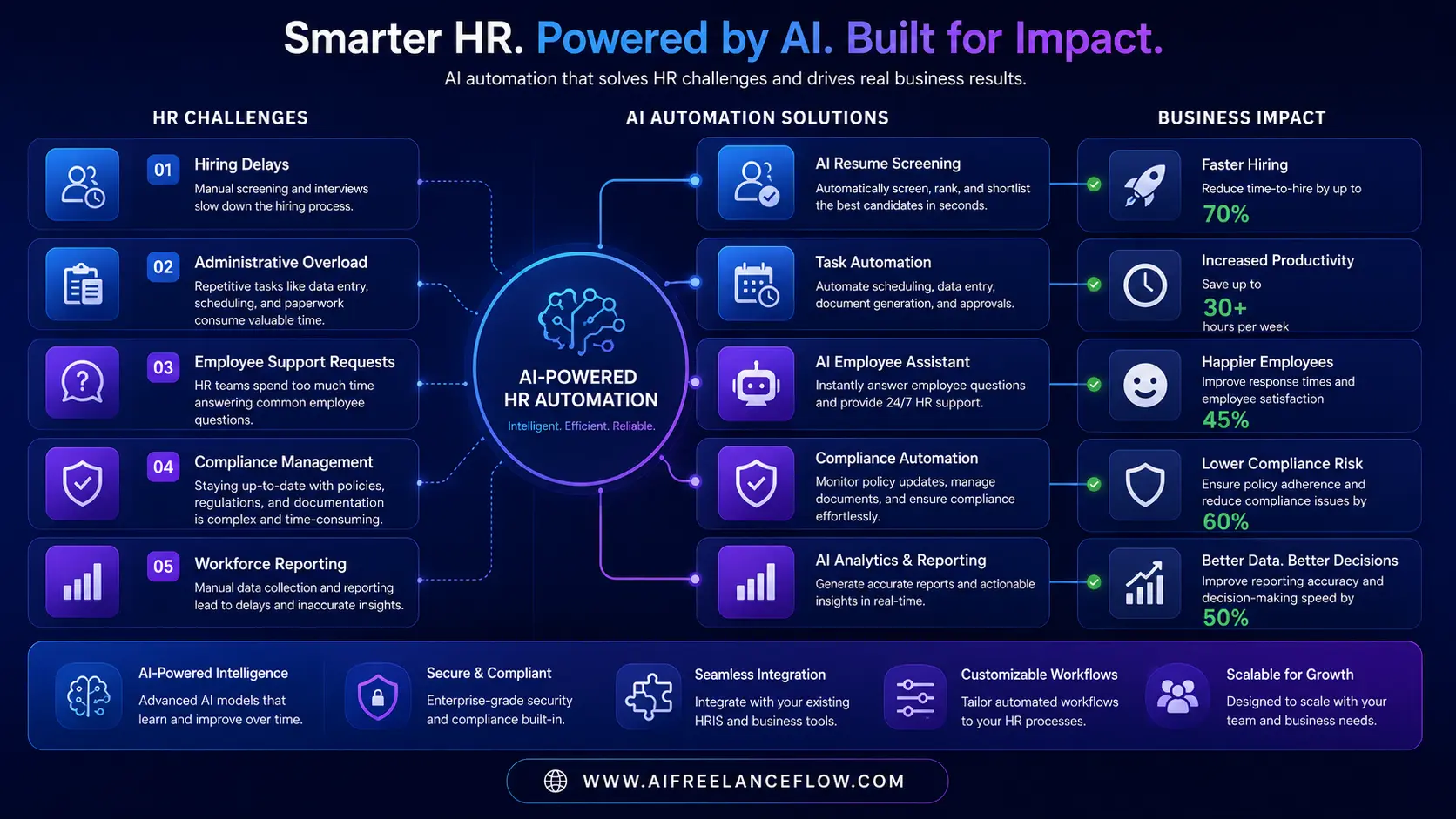
Hiring Too Slowly
Recruiters often spend hours reviewing resumes that don’t match the job requirements. AI can rank applicants based on predefined criteria, helping recruiters prioritize qualified candidates faster.
This doesn’t eliminate human review. Instead, it reduces the amount of manual screening required.
Administrative Overload
HR professionals frequently spend more time updating systems than engaging with employees. Examples include document management, policy updates, contract generation, leave requests, payroll preparation, and interview scheduling.
Many AI tools for HR department teams automate these repetitive administrative tasks.
Employee Support
Employees often ask the same questions repeatedly. Examples include vacation balance, insurance coverage, company policies, remote work rules, payroll dates, and expense reimbursement.
AI-powered HR assistants can answer many of these questions immediately. Employees receive faster support. HR receives fewer repetitive emails.
Compliance Management
HR regulations constantly evolve. Keeping policies updated requires continuous attention.
AI helps organize documentation, identify missing information, and monitor regulatory updates. However, HR professionals should always verify legal decisions themselves.
AI should support compliance, not replace legal expertise. For AI policy updates, you may also follow AI compliance news, compliance AI news, EU AI Act news, and AI regulation news today EU US.
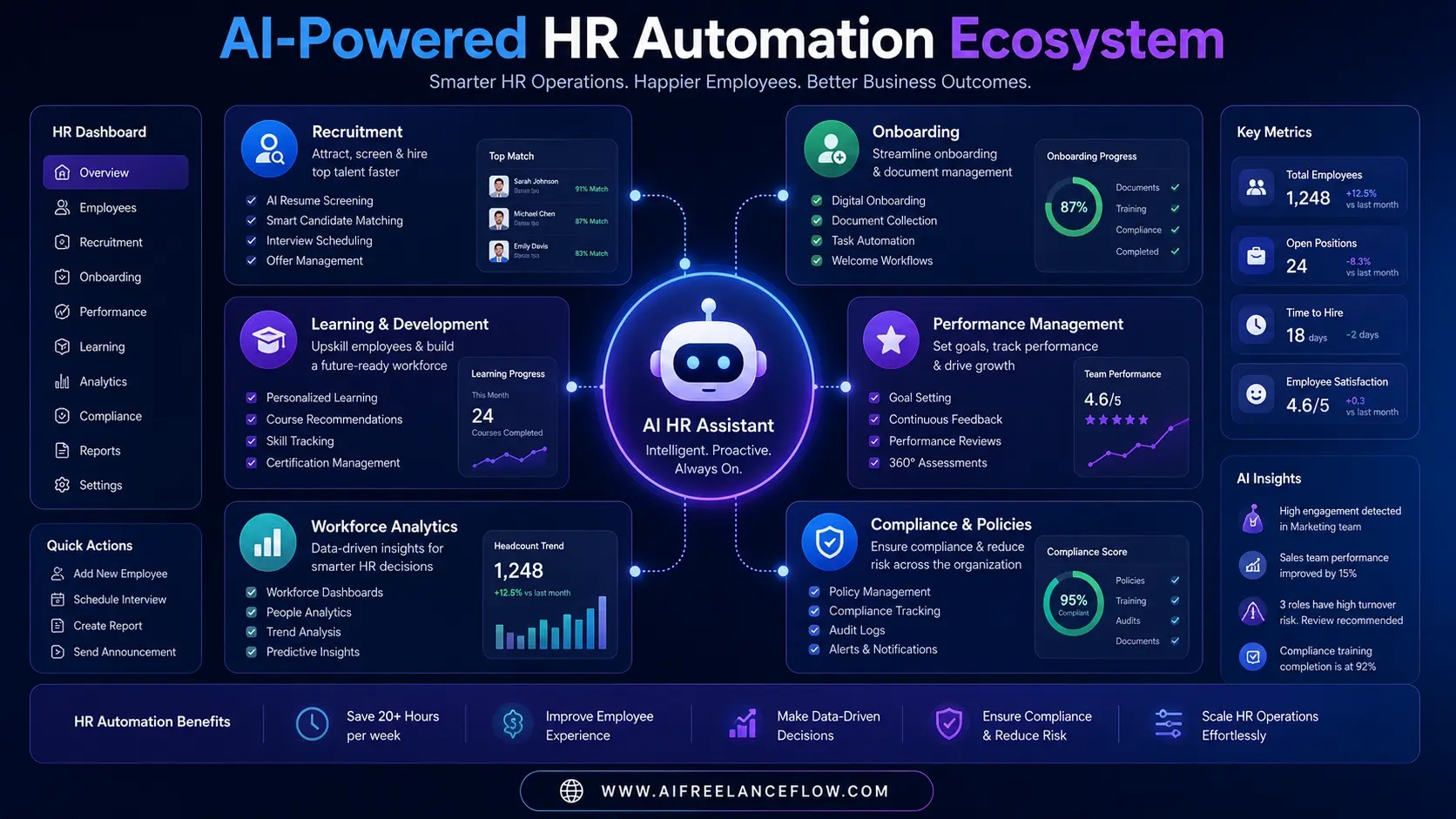
Core Areas Where AI Helps HR Departments
Recruitment
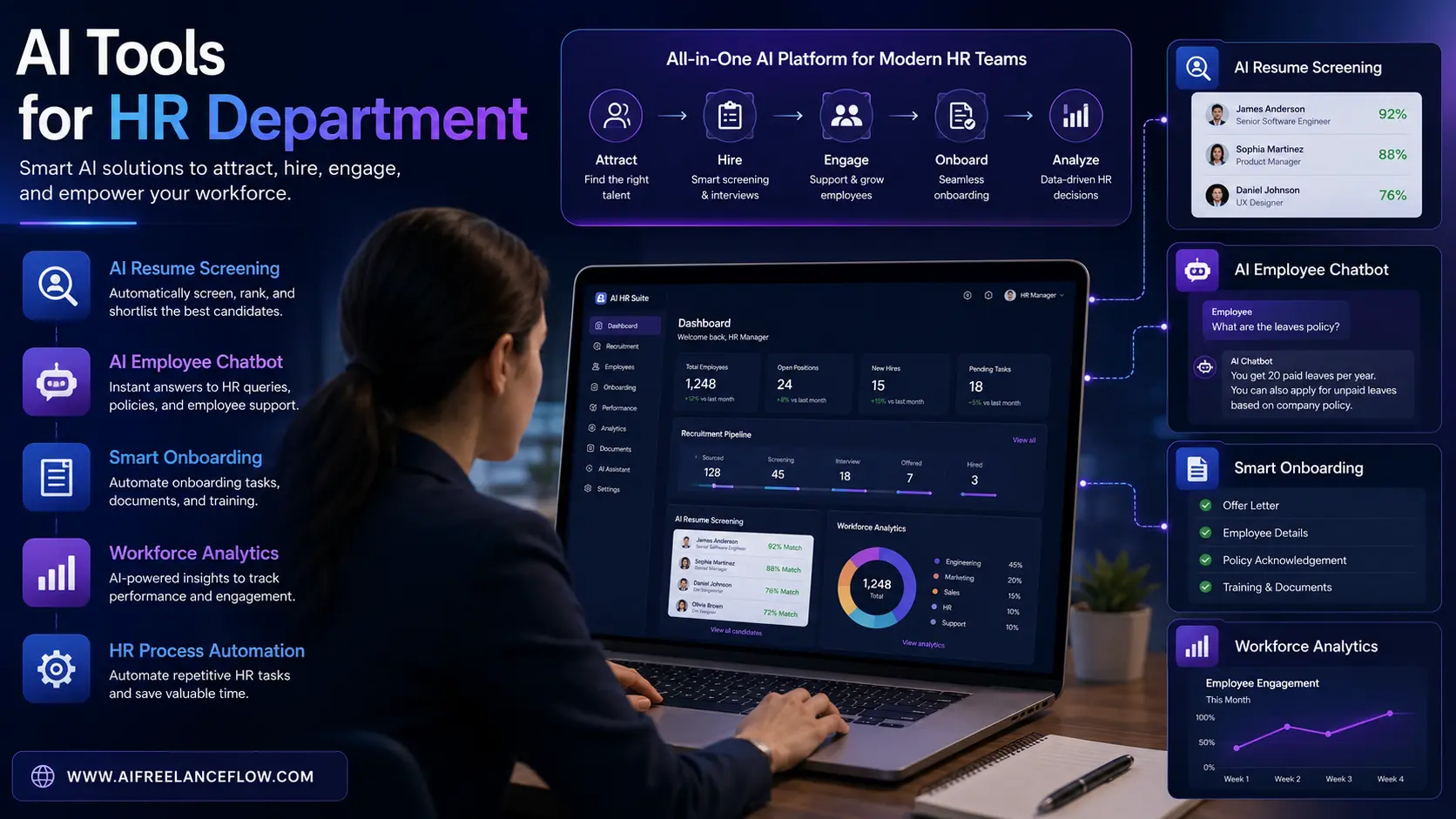
Recruitment is one of the most obvious applications for AI tools for HR department teams. AI can assist with resume parsing, candidate ranking, interview scheduling, skills matching, candidate communication, and job description optimization.
Many recruiters report that AI significantly reduces administrative workload during hiring.
Onboarding
Starting a new job often involves dozens of repetitive tasks. Examples include welcome emails, documentation, equipment requests, training assignments, and policy acknowledgements.
AI can automate much of this workflow. Instead of manually sending each document, HR creates automated onboarding sequences. Employees receive information at the right time. Nothing gets forgotten.
Learning and Development
AI also supports employee development. Examples include personalized learning paths, course recommendations, skill gap analysis, training reminders, and knowledge assessments.
Instead of assigning identical training to everyone, AI can recommend learning based on role, experience, and career goals.
Performance Management
Performance reviews often rely on incomplete information. AI helps organize feedback from multiple sources, including manager reviews, peer feedback, goal completion, training progress, and productivity indicators.
This gives managers better context before evaluation meetings. AI should assist, not replace, human judgment.
Workforce Analytics
Modern HR departments generate enormous amounts of data. AI helps identify patterns such as hiring trends, turnover risks, employee engagement, skills shortages, recruitment efficiency, and training effectiveness.
Instead of manually building reports, HR leaders receive dashboards highlighting important changes.
Benefits of AI Tools for HR Department Teams
Increased Productivity
The most obvious benefit is time savings. Automating repetitive work allows HR professionals to focus on higher-value activities such as employee coaching, culture building, leadership development, and strategic workforce planning.
Better Hiring Decisions
AI doesn’t guarantee better hires. However, it can improve consistency by applying the same evaluation framework across candidates. Recruiters still make the final decision.
Faster Employee Support
Employees appreciate quick answers. AI chatbots can provide immediate responses outside business hours. This improves employee experience while reducing HR workload.
Better Data Organization
Many HR departments struggle with scattered documentation. AI can organize files, categorize information, and make documents easier to retrieve.
Improved Scalability
As organizations grow, HR workload increases dramatically. AI makes it easier to support more employees without increasing administrative work at the same rate.
Common Misconceptions About HR AI
One misconception is that AI will replace HR jobs. Current industry observations suggest something different. Organizations typically use AI to eliminate repetitive administrative work, not the strategic, interpersonal, or leadership aspects of HR.
Another misconception is that AI makes hiring objective. While AI can improve consistency, it still depends on the quality of data, prompts, and configuration. Human oversight remains essential.
Reality Check
The best-performing HR departments are not replacing people with AI. They’re redesigning workflows.
AI handles repetitive tasks. HR professionals focus on people.
That combination usually delivers the strongest long-term results.
What Makes a Good AI Tool for HR?
Not every AI platform is designed for Human Resources.
When evaluating AI tools for HR department teams, look for software that offers strong security, employee privacy controls, HR integrations, workflow automation, document management, reporting, AI assistants, easy onboarding, compliance support, and scalability.
These features matter more than flashy AI marketing claims.
Best AI Tools for HR Department Teams
Quick Answer: The best AI tools for HR department teams depend on your organization’s size, hiring volume, compliance requirements, and existing HR systems.
Some platforms specialize in recruitment, while others focus on onboarding, employee engagement, learning, workforce analytics, or HR automation.
Rather than choosing the platform with the most AI features, choose the one that solves your biggest HR bottleneck.
How to Evaluate AI Tools for HR Department Teams
Before comparing software, define your priorities. Ask questions like: Do we hire frequently? Is onboarding slow? Are employees waiting too long for HR responses? Do managers struggle with performance reviews? Is reporting taking too much time? Are compliance tasks becoming difficult?
The answers usually determine which AI platform provides the highest return on investment.
1. Microsoft Copilot
Best For: Large organizations already using Microsoft 365.
Microsoft Copilot integrates with Outlook, Teams, Excel, Word, and PowerPoint. HR teams can use it to draft HR policies, summarize meetings, create interview questions, prepare onboarding documents, analyze workforce spreadsheets, and generate HR reports.
Advantages: Familiar environment, excellent document generation, strong productivity features, and enterprise security.
Limitations: Less specialized for recruitment compared to dedicated HR software.
2. ChatGPT
Best For: Content creation and HR productivity.
Many HR professionals use ChatGPT for job descriptions, interview questions, employee handbooks, internal announcements, training materials, performance review templates, and HR policy drafts.
Always review AI-generated HR content before publishing. Policies should reflect your organization’s legal and operational requirements.
3. LinkedIn Recruiter AI
Best For: Talent acquisition.
LinkedIn Recruiter can help recruiters find qualified candidates, improve talent matching, generate outreach messages, and recommend potential applicants. This reduces manual sourcing time.
4. Workday AI
Best For: Enterprise HR management.
Workday includes AI capabilities across workforce planning, skills analysis, talent management, internal mobility, and learning recommendations.
Large organizations often choose Workday because HR data already exists inside the platform.
5. BambooHR
Best For: Small and medium-sized businesses.
BambooHR focuses on employee records, time off, performance management, hiring workflows, and HR reporting.
Its simplicity makes adoption easier for growing companies.
6. Eightfold AI
Best For: Skills intelligence.
Eightfold AI helps organizations match candidates, identify internal talent, recommend career paths, and support workforce planning.
It is particularly valuable for companies hiring at scale.
7. HireVue
Best For: Interview automation.
HireVue supports video interviews, scheduling, candidate workflows, and interview management.
Organizations should ensure interview processes remain fair and comply with applicable employment laws.
AI Tools for HR Department Comparison
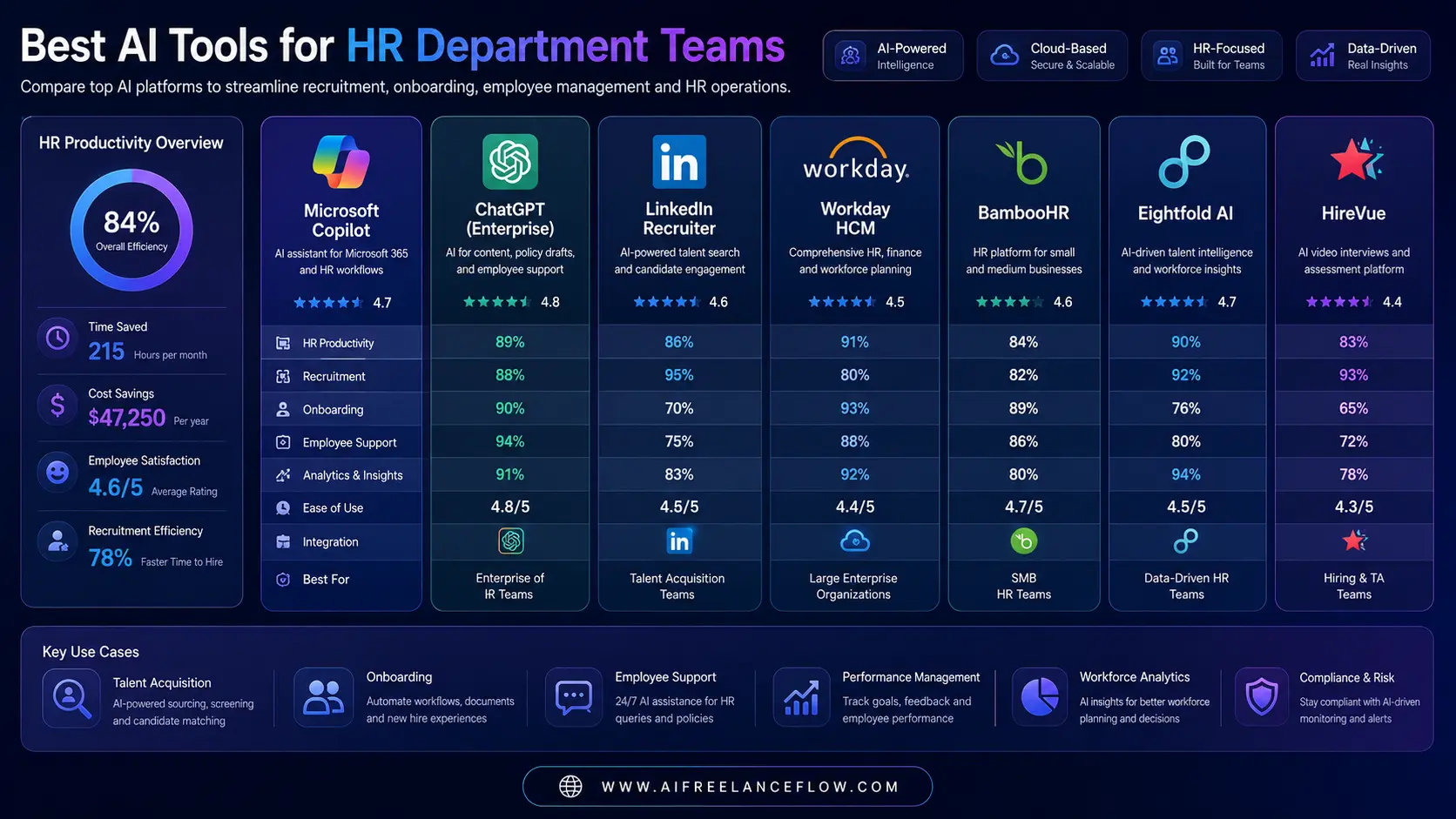
| Tool | Best For | Company Size | Learning Curve | Best Feature |
|---|---|---|---|---|
| Microsoft Copilot | Productivity | Large | Easy | HR documentation |
| ChatGPT | HR writing | All | Easy | Content generation |
| LinkedIn Recruiter AI | Recruiting | Medium-Large | Easy | Candidate sourcing |
| Workday AI | Enterprise HR | Enterprise | Medium | Workforce management |
| BambooHR | SMB HR | Small-Medium | Easy | HR administration |
| Eightfold AI | Talent Intelligence | Enterprise | Medium | Skills matching |
| HireVue | Hiring | Medium-Large | Easy | Interview automation |
Which AI Tool Is Right for Your HR Department?
Best for Small Businesses
Choose BambooHR + ChatGPT. This combination offers simple implementation, affordable HR workflows, and minimal training.
Best for Growing Companies
Choose Microsoft Copilot + LinkedIn Recruiter AI. This combination improves recruiting, documentation, communication, and productivity.
Best for Enterprises
Choose Workday AI + Eightfold AI. These platforms support workforce planning, internal mobility, skills intelligence, and enterprise HR operations.
Decision Framework
Ask yourself what you mainly need.
| Main Need | Recommended Direction |
|---|---|
| Hiring | Recruiting AI |
| Employee support | HR chatbot |
| Reporting | Analytics platform |
| Learning | AI learning platform |
| Productivity | Microsoft Copilot or ChatGPT |
Choose the platform that solves your biggest operational challenge first.
For related HR content, read best free AI tools for human resources, free AI tools for HR, and best AI human resources courses.
How AI Fits Into Daily HR Work
Imagine a typical HR day.
Instead of spending hours on repetitive work, AI handles resume organization, interview scheduling, policy search, FAQ responses, meeting summaries, HR documentation, and draft communications.
Meanwhile HR professionals focus on coaching managers, employee wellbeing, culture, leadership, difficult conversations, and strategic planning.
That’s where the real value appears.
HR Workflow Using AI
A practical workflow might look like this:
| Job Request |
| AI Creates Job Description |
| Recruiter Reviews |
| Job Published |
| Applications Received |
| AI Screens Candidates |
| Recruiter Reviews Shortlist |
| Interview Scheduling |
| Hiring Decision |
| AI Onboarding Workflow |
| Employee Training |
| Performance Tracking |
| Learning Recommendations |
| Retention Monitoring |
Notice something? AI assists almost every stage. But humans still make the important decisions.
HR Automation Checklist
Before implementing AI, confirm your HR department has:
- Standard hiring process
- Updated HR policies
- Digital employee records
- Secure document storage
- Clear approval workflows
- Privacy policies
- Data governance
Automation works best when existing processes are already organized.
Common Mistakes Organizations Make
Buying AI Before Fixing Processes
AI cannot repair broken workflows. Improve your HR process first. Then automate.
Automating Everything
Some HR conversations should never be automated. Examples include performance concerns, employee conflicts, terminations, and sensitive investigations.
These require empathy and professional judgment.
Ignoring Change Management
Employees need training. Managers need guidance. HR teams need time to adapt.
Successful AI implementation includes people, not only software.
Reality Check
One thing many vendors rarely mention: the software is usually the easiest part. Changing HR habits takes longer.
Successful organizations introduce AI gradually. They measure results. They collect employee feedback. Then they expand automation.
Measuring Success
How do you know whether AI is working? Track metrics like:
| KPI | Why It Matters |
|---|---|
| Time-to-hire | Recruiting efficiency |
| Cost-per-hire | Recruitment ROI |
| Employee response time | HR service quality |
| Onboarding completion | Employee readiness |
| Training participation | Learning effectiveness |
| Employee satisfaction | Overall HR performance |
Good AI improves processes. These metrics help prove whether that improvement is actually happening.
Information Gain: Where AI Should NOT Replace HR
Many articles focus only on automation. A better question is: where should HR remain completely human?
Examples include career coaching, sensitive employee conversations, leadership development, conflict resolution, organizational culture, diversity and inclusion discussions, executive hiring, and performance coaching.
These situations rely on empathy, trust, and context. AI can support preparation. It should not replace human judgment.
30-Day AI Implementation Roadmap for HR Departments
This roadmap is an illustrative example and not a guarantee of results.
Implementing AI tools for HR department teams doesn’t require replacing your entire HR system overnight. The most successful organizations introduce AI gradually, allowing employees, managers, and HR professionals to adapt while measuring real business outcomes.
Week 1 — Assess Current HR Processes
The first week should focus on understanding how your HR department currently operates. Review which tasks consume the most time, where employees wait the longest, which repetitive activities could be automated, what HR software already exists, and where productivity bottlenecks appear.
Avoid purchasing software before understanding your workflow.
Week 2 — Introduce One AI Solution
Instead of implementing multiple platforms simultaneously, begin with one. Examples include AI recruiting assistant, HR knowledge chatbot, AI document generator, interview scheduling assistant, or employee onboarding automation.
This allows your HR department to learn gradually.
Week 3 — Measure Performance
After implementation, compare performance before and after using AI tools for HR department teams. Track recruitment speed, employee response times, HR workload, administrative hours, hiring efficiency, and manager satisfaction.
Small improvements often justify further automation.
Week 4 — Expand Carefully
Only after successful adoption should additional workflows be automated. Potential next steps include performance management, learning recommendations, HR analytics, internal mobility, and workforce planning.
Gradual adoption usually produces better long-term results than large-scale implementation.
30-Day HR AI Roadmap
| Week | Primary Goal | Expected Outcome |
|---|---|---|
| Week 1 | Audit HR processes | Identify automation opportunities |
| Week 2 | Implement one AI solution | Reduce repetitive HR work |
| Week 3 | Measure performance | Validate productivity improvements |
| Week 4 | Expand automation | Build scalable HR operations |
AI Maturity Framework for HR Departments
Level 1 — Manual HR
Characteristics include paper-based processes, manual recruitment, email communication, and spreadsheet reporting.
Level 2 — Digital HR
Characteristics include HR software, cloud storage, digital onboarding, and employee portals.
Level 3 — AI-Assisted HR
Characteristics include resume screening, AI document generation, interview scheduling, and employee chatbots. Many organizations currently operate here.
Level 4 — AI-Optimized HR
Characteristics include predictive workforce planning, skills intelligence, personalized learning, advanced workforce analytics, and HR automation across multiple processes.
This represents the direction many enterprises are moving toward.
Expected ROI
Every organization is different. However, AI tools for HR department teams generally provide value in several areas.
| Area | Potential Benefit |
|---|---|
| Recruitment | Faster hiring workflows |
| Administration | Reduced manual tasks |
| Employee Support | Faster response times |
| Documentation | Improved organization |
| Analytics | Better workforce insights |
| Learning | Personalized development |
Notice that these benefits focus on efficiency rather than replacing HR professionals.
HR Tasks That Should Remain Human
AI should support HR, not replace it. The following activities require human judgment:
- Performance coaching
- Employee wellbeing
- Leadership development
- Workplace conflict resolution
- Compensation discussions
- Sensitive investigations
- Executive hiring
- Organizational culture
- Diversity and inclusion initiatives
- Career mentoring
These conversations depend on empathy, experience, and context.
Best Use Cases for AI Tools for HR Department Teams
Recruitment
AI helps identify qualified candidates faster while reducing repetitive screening work.
Employee Onboarding
Automated onboarding ensures every employee receives consistent documentation, training, and communication.
HR Knowledge Base
AI assistants answer frequently asked employee questions regarding benefits, leave, company policies, and internal procedures. This reduces repetitive HR support requests.
Performance Reviews
AI organizes feedback from multiple sources before managers complete evaluations. Managers remain responsible for final decisions.
Learning and Development
AI recommends personalized learning paths based on skills, career goals, previous training, and job roles.
Workforce Planning
AI identifies trends involving hiring demand, skills shortages, internal mobility, and workforce capacity. These insights help HR leaders make better strategic decisions.
Pros and Cons
Advantages
- Faster recruitment
- Reduced administrative work
- Better employee support
- Improved reporting
- Scalable HR operations
- More consistent documentation
- Better workforce insights
- Increased productivity
Limitations
- Requires quality data
- Human oversight remains essential
- Initial implementation takes time
- Employee training is necessary
- Compliance still requires legal review
- AI recommendations should never replace HR judgment
Expert Recommendations
Start Small
Implement one AI solution first. Master it before expanding.
Standardize Processes
AI performs best when workflows are already organized. Document HR procedures before automating them.
Train HR Teams
Technology adoption succeeds when employees understand why AI is being introduced, how it improves daily work, and where human decisions remain essential.
Review AI Outputs
Never publish AI-generated HR policies without review. Always verify legal accuracy, company alignment, and compliance requirements.
Measure Results
Track KPIs consistently. Without measurement, it’s impossible to know whether AI is delivering value.
If your HR department is also building broader AI operations, check guides like AI automated income system, AI passive income generator, and future of AI.
Frequently Asked Questions
What are AI tools for HR department teams?
AI tools for HR department teams are software solutions that automate HR tasks, improve recruitment, support onboarding, organize employee information, and provide workforce insights using artificial intelligence.
Can AI replace HR professionals?
No. AI reduces repetitive work but cannot replace human leadership, empathy, strategic thinking, or employee relationships.
Are AI recruiting tools accurate?
They can improve efficiency, but recruiters should always review recommendations before making hiring decisions.
Which HR departments benefit most from AI?
Organizations of every size can benefit. However, growing companies and enterprises usually experience the greatest productivity improvements.
Is AI expensive for HR?
Costs vary. Many organizations begin with affordable AI productivity tools before investing in enterprise HR platforms.
Does AI improve employee experience?
Yes. Employees often receive faster responses, better onboarding, personalized learning, and improved communication.
Can AI help HR compliance?
AI assists with organization and monitoring. Final legal responsibility always remains with HR and legal professionals.
Is AI suitable for small businesses?
Absolutely. Many small businesses start with simple AI writing assistants, HR chatbots, and recruitment automation before expanding.
How long does HR AI implementation take?
Most organizations begin seeing workflow improvements within a few weeks, while larger digital transformation projects may take several months.
What should HR automate first?
Many organizations begin with resume screening, interview scheduling, employee FAQs, HR documentation, and onboarding. These usually provide the quickest productivity gains.
Final Verdict
The role of Human Resources continues to evolve, and AI tools for HR department teams are becoming an essential part of that transformation.
Rather than replacing HR professionals, AI removes repetitive administrative work so teams can focus on higher-value responsibilities like employee development, organizational culture, leadership support, and strategic workforce planning.
The organizations seeing the strongest results are not adopting AI simply because it’s popular. They are selecting solutions that solve real business problems, implementing them gradually, measuring outcomes, and keeping people at the center of every decision.
If your HR department is just beginning its AI journey, start with one practical use case such as recruitment, onboarding, or employee support. Build confidence, gather feedback, and expand your automation strategy over time.
When implemented thoughtfully, AI tools for HR department teams can improve efficiency, enhance the employee experience, and help HR professionals spend less time on repetitive administration and more time creating value for both employees and the business.
Next Steps
If you’re planning to modernize your HR operations, audit your current HR workflow, identify repetitive tasks, choose one AI solution that addresses your biggest challenge, train your HR team, measure results consistently, and expand automation only after proving value.
This gradual approach creates a stronger foundation for long-term HR transformation while maintaining the human expertise that every successful organization depends on.
Build a Smarter HR Workflow with AI
Start with one practical use case, measure results, and expand your HR automation strategy only after proving value.
Explore Free AI Tools for HR